 BYOA
BYOAAgent wallet for Windows
The first working agent wallet: a small app in the system tray that lets the sites you allow use your own AI, within limits you set. It holds no model of its own: after your yes it passes a site's request to a program on your computer that runs one (the Llama app, LM Studio, Ollama), or to your own paid key.
- Version 0.1.0 · ZIP, 44.4 MB
- Windows 10 or 11, 64-bit; nothing else to install
- SHA-256
1c3cf9ef0d3259920c159e78a96f7b7fec3654789db469ec9724060cbd7cb62f - Not code-signed yet: Windows may warn you, see why
Source code · Apache 2.0 · How to install
What it does
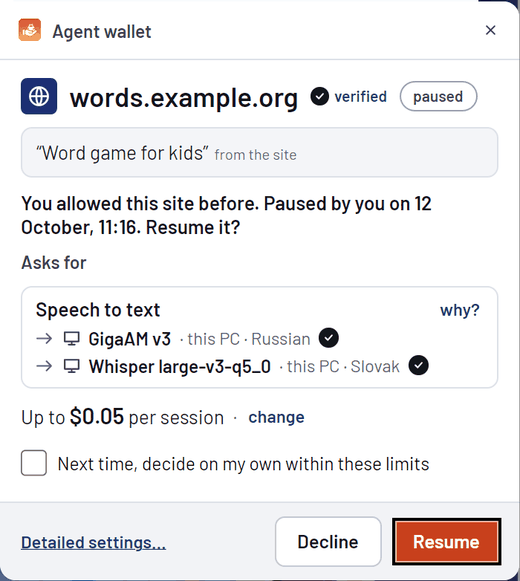
- A site asks only after you click something on it. The wallet shows a small notice above the tray, then a short consent window: the site, verified by the browser, its purpose in its own words, which of your models answers each language, and a budget per session.
- Speech to text and text answers come from models that run in a program on this computer, such as the Llama app, LM Studio or Ollama, or on a home server. For speech we recommend Qwen3-ASR in Llama: on our test computer it took 0.1 to 0.9 s a clip. The wallet only hands the request over: it holds no model and downloads none. You add a model once, under Sources.
- Your own OpenRouter key can be a paid fallback (ElevenLabs Scribe v2, about $0.00004 a second). It asks before it runs: allow once, always for this site, or no.
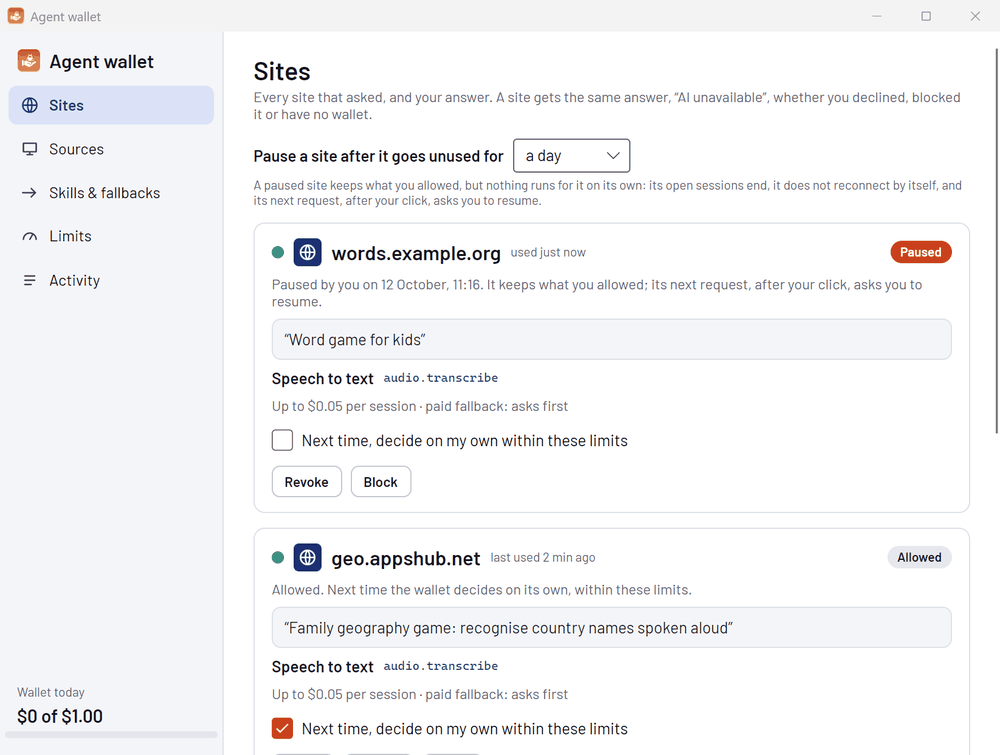
- Its settings: Sites (pause, revoke, block, let it decide on its own; an activity dot shows when each site last used it), Sources, Skills & fallbacks, Limits and Activity, 50, 100 or 200 entries a page.
- An allowed site that goes unused for a day is paused (you can choose an hour, a week or never). It keeps what you allowed, but nothing runs for it until its next request, after your click, and your Resume.
- Sites reach it in two ways: through the Chrome extension, or with a
bringyourownagent://link and no extension at all. How a site does it - Your own AI agent (Claude Code, Codex, OpenCode) can help set it up: add a model, change the order, test a model. The wallet asks you before it lets an agent in. Through the wallet, an agent never gets your keys and cannot allow a site; with Full access it can also pause, resume, revoke, block or unblock a site, and change your limits. A model server on another computer needs your confirmation. A program that runs as you can read the wallet's files, so connect only agents you trust.
Text answers
A site can ask for text.generate: a written answer to a message, such as a yes-or-no question in a game. It needs a text source that you already run or pay for: the Llama app, LM Studio or Ollama on this computer, or a provider you reach with your own key (OpenRouter with hundreds of models, OpenAI, Anthropic, Google, MiniMax, DeepSeek, xAI, Z.ai, Mistral or another OpenAI-style service), which is paid and asks before it runs. Without one, a site that requires it gets no Allow; the Twenty Questions game at twenty-questions.appshub.net is an example of a site that uses it. A site that needs the opinions of several different AIs, such as whoisright.org, says so and says why: you tick which of your models it gets, it sees only those (their names only if it asked and you allow), and you can change the choice and the limits for that site at any time. You decide the longest text a site may send, the longest answer, how long the wallet waits and how many questions run at once, for every site or for one.
What it keeps, and what it does not
- No audio and no text. The activity log keeps the time, the site, the skill, the model that answered, the route and the cost.
- API keys are encrypted with Windows DPAPI for your account only, never shown again, never logged, and sent only to their own provider.
- Before you press Allow, a link from a site makes the wallet contact nothing at all. A site you declined or blocked hears only “AI unavailable”, as if you had no wallet.
- It talks to the network only for the site you allowed, for the provider of a key you added, and for a model server on another computer that you confirmed. It downloads no model.
- It writes three registry keys for your Windows user (the browser helper for Chrome and Chromium, and the bringyourownagent:// links), and nothing else.
Requirements
- Windows 10 or 11, 64-bit. The .NET runtime is inside the package; nothing else to install.
- About 100 MB on disk. The wallet holds no model, so install a program that runs one: the Llama app is free (llama.app) and downloads a model that fits your computer. For speech to text, run a speech model in it, for example Qwen3-ASR, and add it under Sources with the skill Speech to text. The first request after the program starts can wait while it loads the model: about a minute on a cold disk.
- A graphics card makes a speech model fast: on our test computer Qwen3-ASR in Llama took 0.1 to 0.9 s a clip. Until a speech model is added, speech to text uses your own paid key, which asks before it runs.
- For sites that use the extension: Google Chrome or Chromium. Sites that open a bringyourownagent:// link need no extension.
Install
- Download
byoa-wallet-win-x64.zipand check it in PowerShell; the result must be the SHA-256 above:Get-FileHash .\byoa-wallet-win-x64.zip -Algorithm SHA256 - Unzip the whole package: right-click the zip file, Extract All.
- Open the folder whose name starts with
byoa-walletinside the folder that Extract All made, and double-clickInstall.cmdin it. It copies the wallet into%LOCALAPPDATA%\BYOA\wallet-appand registers it for your Windows user. To start the wallet with Windows as well, runInstall.cmd -StartWithWindows. - Optional, for sites that use the extension: open
chrome://extensions, turn on Developer mode, press Load unpacked and choose%LOCALAPPDATA%\BYOA\wallet-app\extension. - Open a site that uses BYOA, for example the voice geography game at geo.appshub.net, and press its button. The wallet starts by itself when a site asks.
To update, quit the wallet from its tray icon (right-click, Quit), unzip the new package and run its Install.cmd.
If Windows warns you
This build is not code-signed yet. When you start Install.cmd, Windows may first show “Open File - Security Warning” with “Unknown Publisher” and the buttons Run and Cancel. This is expected: check the SHA-256 first, and if it matches, press Run. Windows SmartScreen may also show “Windows protected your PC” when you run Install.cmd or the wallet for the first time: choose More info, then Run anyway.
You can also right-click the zip file, open Properties and tick Unblock before you unzip it. The installer removes the “downloaded from the internet” mark from its own copy, so Windows does not ask again each time a site starts the wallet.
Uninstall
Quit the wallet from its tray icon, then run %LOCALAPPDATA%\BYOA\wallet-app\Uninstall.cmd (also in the unzipped folder). It removes the three registry keys and the Startup shortcut, if you made one. It deletes no files: it lists the folders below, so that you can remove them yourself. Speech models that earlier versions of the wallet downloaded (up to about 1.5 GB) are not used any more; you can delete them. Uninstall.cmd -WhatIf only shows what it would do. Remove the extension in chrome://extensions, if you loaded it.
Where things are
- The app
%LOCALAPPDATA%\BYOA\wallet-app- Settings
%LOCALAPPDATA%\BYOA\wallet\settings.json(sites, sources, routes, limits; no secrets)- API keys
%LOCALAPPDATA%\BYOA\wallet\secrets.dat(DPAPI, your account only)- Pairings of links
%LOCALAPPDATA%\BYOA\wallet\pairings.dat(DPAPI; only for sites that may decide on their own)- Activity
%LOCALAPPDATA%\BYOA\wallet\activity-*.jsonl(no audio, no text)- Models of earlier versions
%LOCALAPPDATA%\BYOA\wallet\models
Source code
Everything is in the wallet folder of the public repository, under the Apache 2.0 license: the tray app, the browser helper, the extension, the tests and the script that builds this package. The design and the security notes: docs/wallet-0.1.md. With the .NET 10 SDK you can build and install it from the source with wallet\install.ps1.
Try it on a real site.
The voice geography game hears its players only through their own wallets: name countries out loud, and the map fills in.